
Pax A910s Sim Card Size and Activation Steps
SIM Card Size and Insert
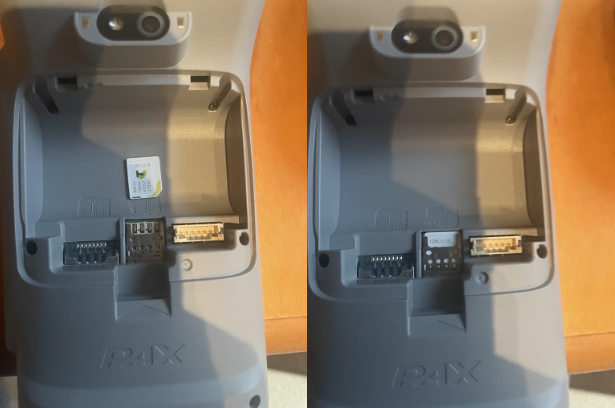
The A910S terminal does require a different size SIM card to the A920. The sim card required is shown below and where to insert into the terminal for activation.

The battery cover and battery will need to be removed to insert the sim card. PLEASE remember to plug the battery back into the power slot after sim inserted.
SIM Card Activation
When activating the SIM cards, you need to add a new Access Point to the PAX device to get them to work.
Pull from the top of the A910s and select Data. Then select Access Point Names

Then select Access Point Names

Click on the + to add a new APN with the following details:
Name: NewAPN
APN: Telstra.m2m
APN type: default,supl,ia

Click on the 3 dots at the top and select Save
Select this new APN to be used
If the new APN is not selectable in the Access Point Names list, go back in and re-enter the APN type values to ensure they are exactly as listed, with no extra spaces, and with correct capitalisation.